
MELYTRO
The vocal chain that listens first.
MELYTRO listens to your voice, then sets its tone, EQ, key and range to suit it. A complete vocal chain from clean-up to loudness, with 43 genre styles, in one VST3.
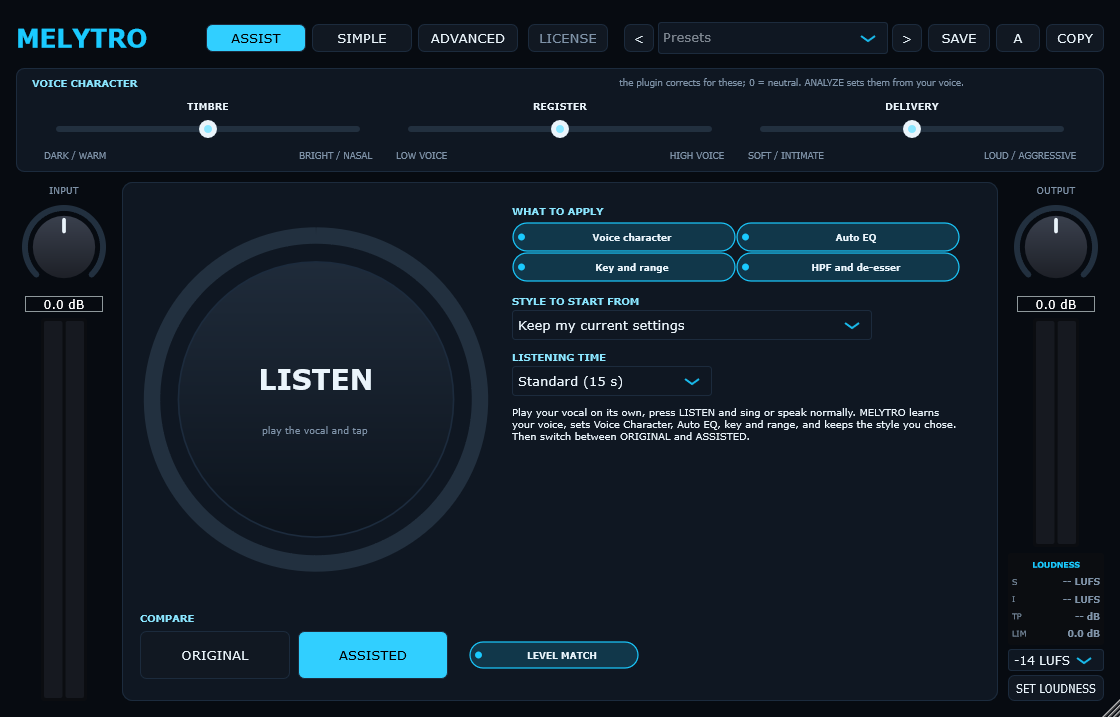
Let it lead, or take every control.
ASSIST
Press LISTEN and sing or speak. MELYTRO learns your voice and sets voice character, auto EQ, key and range, plus high-pass and de-esser. Then compare ORIGINAL and ASSISTED at matched level.
SIMPLE
The few controls that matter on one screen, for fast sessions.
ADVANCED
Every module and every setting: chain, space, tune, EQ and match pages.
Everything a lead vocal needs, in order.
Clean-up
High-pass filter and automatic EQ that finds mud, boxiness, harshness and resonances in your voice.
Pitch correction
Key, scale, speed and tolerance, with a Keep Formants mode so the voice keeps its natural character when tuned.
Dynamic EQ
4 manual and 6 automatic bands, each with optional dynamics, on an interactive graph with undo and redo.
Presence and air
Adds forward presence and top-end air.
Two-stage compression
A fast FET-style compressor followed by a slow opto-style leveler.
De-esser
Split-band mode that only turns down the 's' range, not the whole voice.
Saturation
Warmth and grit, processed at 4x oversampling to keep it clean.
Delay and reverb
Tempo-synced delay with ping-pong and ducking; an adaptive reverb that ducks under the voice.
Depth
One control that places the voice from upfront to far back in the mix.
True-peak limiter
Look-ahead output ceiling so the vocal never clips.
MATCH
Measure a reference voice and match your vocal's tone to it with an 8-band EQ.
Loudness target
Live short-term and integrated LUFS and true peak. Pick -16, -14, -11 or -9 LUFS and SET LOUDNESS adjusts the output.
A/B and compare
Two complete settings to switch between, and ORIGINAL / PROCESSED at matched level.
Your presets
Save, rename and organise your own presets.
43 genre styles
Starting points written from how records in each genre are mixed, then adapted to your voice.
The demo is the full plugin.
- Download and install it for free. Every feature works.
- Until activated, it goes quiet for 2 seconds every 45 seconds and cannot save presets.
- Buy a license, paste your key into ACTIVATE, and it is unlocked straight away.
System requirements
- Format
- VST3, 64-bit
- System
- Windows 10 or 11, 64-bit
- macOS
- Not available yet
- Hosts
- Any 64-bit VST3 host on Windows
- Latency
- Reported to your DAW for automatic compensation; higher with pitch correction on
- Installer
- About 4 MB
- License
- One key in your name. Works offline, on your computers, for every 1.x update. No iLok, no account needed in the plugin.
Up and running in a minute.
1 · Install
Run the installer. MELYTRO goes into the standard VST3 folder, C:\Program Files\Common Files\VST3, which every Windows DAW scans.
2 · Rescan
Open your DAW and rescan plugins if MELYTRO is not listed. FL Studio: Options › Manage plugins › Find plugins.
3 · Activate
Click ACTIVATE at the top of MELYTRO and paste the key from your purchase e-mail.
Windows may show "Windows protected your PC" for a new installer: choose More info › Run anyway.